Setting up IPTV for the first time can feel like learning a new language. M3U, EPG, HEVC, bitrate, portal URL… This glossary explains the terms you are most likely to meet, in plain English, grouped by topic so related ideas sit together.
The basics
- IPTV (Internet Protocol Television)
- Television delivered over an internet connection instead of a satellite dish, aerial or cable. You watch through an app on a Smart TV, box, stick, phone or computer.
- Live TV
- Channels streamed as they are broadcast, just like traditional TV.
- VOD (video on demand)
- Films and series you can start whenever you like, rather than at a scheduled time. Every IPTV Cyprus plan includes 128K+ movies and series on demand.
- Stream
- Video sent to your device piece by piece while you watch, rather than downloaded in full first.
- Player app
- The app on your device that plays IPTV. It shows the channel list, the TV guide and the on-demand library. Different devices use different player apps.
- OTT (over-the-top)
- An industry term for any video service delivered over the open internet, “over the top” of your broadband connection.
Features you will use every day
- EPG (Electronic Programme Guide)
- The on-screen TV guide showing what is on now, next and earlier on each channel. Our catch-up TV guide shows how to use it step by step.
- Catch-up
- A feature that lets you replay programmes that have already aired on a live channel, straight from the EPG. Availability depends on the channel.
- Favourites
- A personal shortlist of channels so you do not have to scroll through the full line-up.
- Channel groups (categories)
- Sections of the channel list, such as news, sport, movies, kids, or channels from a particular country.
- Anti-freeze
- Technology on the server side designed to keep streams playing smoothly at busy times. See IPTV anti-freeze explained.
- VPN (virtual private network)
- An encrypted connection that keeps your streaming private from others on the same network. Every IPTV Cyprus plan includes a built-in VPN.
Picture quality
- Resolution
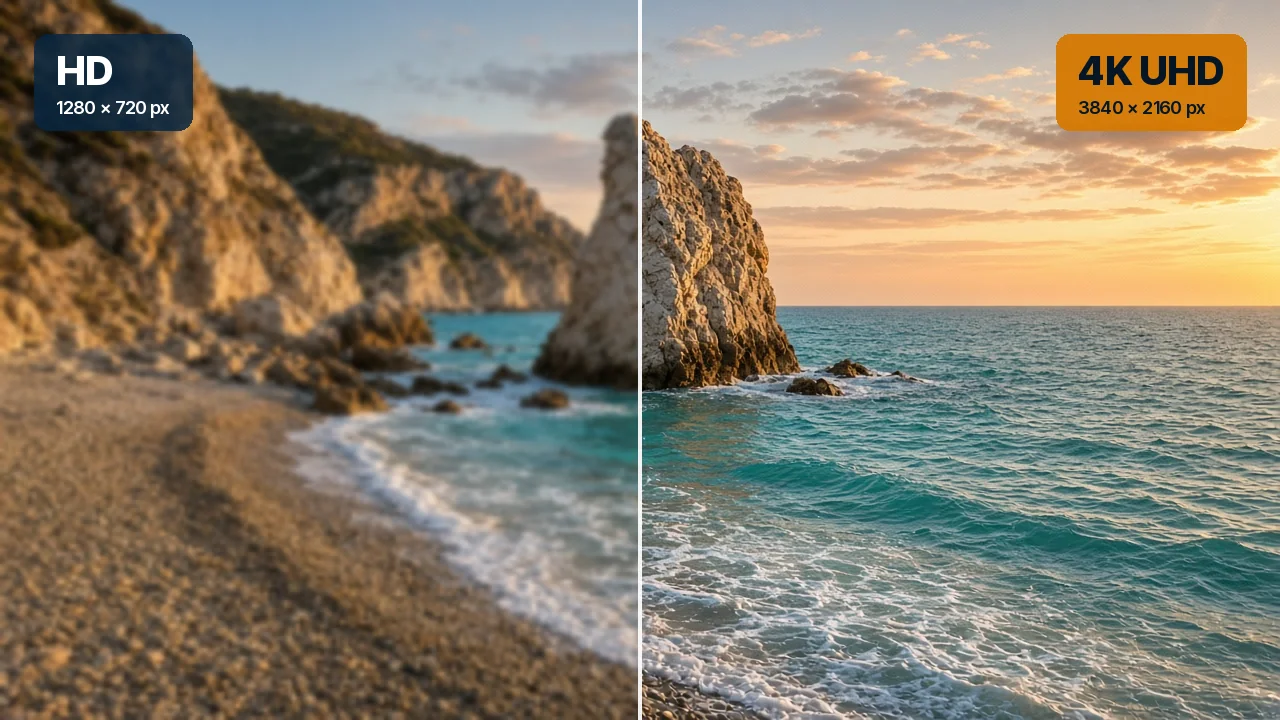
- The number of pixels in the picture. More pixels mean finer detail, provided your screen can show them.
- HD and Full HD
- HD is 1280 × 720 pixels (720p); Full HD is 1920 × 1080 (1080p).
- 4K (Ultra HD)
- 3840 × 2160 pixels: four times the detail of Full HD. Needs a 4K TV and around 25 Mbps.
- 8K
- 7680 × 4320 pixels: four times the detail of 4K. Needs an 8K TV and around 50 Mbps. Our article 4K vs 8K IPTV explains whether it is worth it.
- HDR (high dynamic range)
- A picture format with brighter highlights, deeper shadows and richer colour than standard pictures. Your TV switches to HDR automatically when the content supports it.
- Frame rate (fps)
- How many pictures are shown per second. Films are usually 24 fps; live sport is often 50 fps, which makes fast movement look smoother.
- Upscaling
- When a TV enlarges a lower-resolution picture to fill its screen, for example showing HD on a 4K TV. Good TVs upscale very well.
Video formats (codecs)
- Codec
- The method used to compress video so it can travel over the internet, and then decompress it on your device. Your device must support the codec a stream uses.
- H.264 (AVC)
- An older, very widely supported codec. Almost every device can play it.
- HEVC (H.265)
- A newer codec that delivers the same picture quality at roughly half the data of H.264. It is widely used for 4K. Most TVs and boxes from recent years support it.
- AV1
- An even more efficient modern codec, increasingly used for high-resolution streaming. Support depends on how recent your device is.
- Bitrate
- How much data a stream uses each second, measured in megabits per second (Mbps). Higher bitrates generally mean better picture quality and need faster connections.
- Adaptive bitrate
- A technique that lets the player switch between quality levels to match your connection, lowering the quality briefly instead of stopping when your speed dips.
Setup and logins
- Login details
- The details you enter in the player app to access the service. We send these on WhatsApp when you order, with setup steps for your device.
- M3U playlist
- A simple file format that lists channels and where to find their streams. Some player apps ask for an M3U link during setup; we tell you exactly what to enter for your app.
- Portal URL
- A web address some devices, such as MAG boxes, use to connect to an IPTV service. You enter it once in the device settings.
- MAC address
- A unique identifier printed on network devices such as MAG boxes. Some setups use it to link the device to your plan, so we may ask for it when you order.
- Set-top box
- A small box that connects to your TV and runs a player. MAG boxes and Android TV boxes are common examples.
- Streaming stick
- A compact device that plugs straight into an HDMI port and turns any TV with HDMI into a smart TV.
Network and connection
- Mbps (megabits per second)
- The unit used for internet speed. We recommend at least 10 Mbps for HD, 25 Mbps for 4K and 50 Mbps for 8K.
- Bandwidth
- The total capacity of your connection. Everything in your home shares it, so a large download can take bandwidth away from your stream.
- Buffering
- When playback pauses because the player has run out of video data and is waiting for more to arrive. Often caused by weak Wi-Fi.
- Latency
- The delay between data being sent and arriving. Low latency helps channels start quickly when you change them.
- Ethernet
- A wired network connection using a cable between the router and your device. The most stable option for IPTV; see Wi-Fi vs Ethernet for IPTV.
- Mesh Wi-Fi
- A system of two or more Wi-Fi units that work together to cover a whole home with one strong network.
- 2.4 GHz and 5 GHz
- The two Wi-Fi bands most routers use. 5 GHz is faster over short distances; 2.4 GHz reaches further but is slower.
A few more you may see in settings menus
- Firmware
- The built-in software of a TV, box or router. Updates often improve playback and add support for newer video formats.
- HDMI 2.1
- The latest common HDMI standard, needed for 8K from an external box. Use an Ultra High Speed HDMI cable with it.
- Overscan
- A TV setting that crops the edges of the picture. Turn it off (often called “Just Scan” or “Screen Fit”) so you see the full 4K image.
- Aspect ratio
- The shape of the picture, usually 16:9 for TV. If the picture looks stretched or squashed, check this setting in the app or on the TV.
Frequently asked questions
Do I need to understand all of this to use IPTV?
No. When you order, we send step-by-step instructions for your device and help on WhatsApp if anything is unclear. This glossary is here for when you are curious, or when an app uses a word you do not recognise.
Which terms matter most when buying?
Resolution (HD, 4K, 8K), recommended speed in Mbps, catch-up and EPG, and whether support is included. Every IPTV Cyprus plan includes all of these.
What should I do if my app asks for something I do not have?
Send us a photo of the screen on WhatsApp and we will tell you exactly what to enter.
Now that the jargon makes sense, see how it all comes together on our IPTV packages page, or contact us with any question. For the full overview, visit IPTV Cyprus.